Tutorial 32: BasicEffect and 3D Lighting
What you’ll learn
- The
BasicEffectproperty surface at a glance. - Configuring the three directional lights, ambient colour and
EnableDefaultLighting(). - Diffuse and emissive colour, and the
VertexColorEnabled/TextureEnabledswitches.
Before you start — Tutorial 31: Your First 3D Triangle — this expands the effect you already used to draw one triangle. Requires a 3D-capable renderer such as OPENGLES3 or VULKAN; the 2D-only renderer (SDL_RENDERER) throws on 3D calls by default, and STUB reports no 3D capability at all.
Colour convention: Lighting properties on BasicEffect (AmbientLightColor, DiffuseColor, EmissiveColor, light colours) use Vector3(R, G, B) with components in the range 0–1. This is different from the Color struct used in 2D, which packs R/G/B/A as bytes 0–255.
BasicEffect Properties Overview
BasicEffect is the standard shader bundled with CNA, modelled directly on XNA's BasicEffect. It handles the most common rendering scenarios without requiring a custom GLSL/HLSL shader. Its properties fall into four groups:
| Group | Key Setters |
|---|---|
| Transform | setWorldProperty, setViewProperty, setProjectionProperty |
| Lighting | setLightingEnabledProperty, setAmbientLightColorProperty, DirectionalLight0/1/2, EnableDefaultLighting(), setPreferPerPixelLightingProperty |
| Material | setDiffuseColorProperty, setEmissiveColorProperty, setSpecularColorProperty, setSpecularPowerProperty, setAlphaProperty |
| Mode | setVertexColorEnabledProperty (or the public VertexColorEnabled field), setTextureEnabledProperty, setTextureProperty |
All properties are accessed through getXProperty()/setXProperty() methods (the matrices and VertexColorEnabled are also public fields). Changes take effect on the next pass.Apply() call.
LightingEnabled
Call setLightingEnabledProperty(true) to activate the Blinn-Phong lighting model. Without it the shader ignores all light and simply renders the raw DiffuseColor (or vertex colour if VertexColorEnabled). Lighting also requires VertexPositionNormalTexture or another vertex type that carries a normal — without a normal the GPU has no surface direction to shade.
effect_->setLightingEnabledProperty(true);   // activate lighting pipeline
// effect_->setLightingEnabledProperty(false); // flat colour — no normals needed
Lighting off, lighting on, lighting per pixel
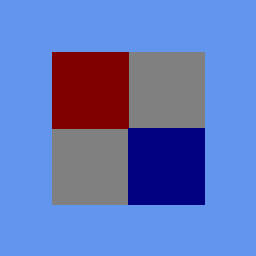
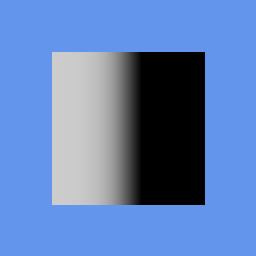
The frames below are from CNA's XNA oracle corpus (tools/xna-oracle/) — genuine Microsoft XNA 4.0 runtime output (captured under Wine + DXVK on Linux), against which CNA's DIRECTX9 renderer is diffed at --tolerance 0 by hand, outside CI. The first two are the same textured quad with lighting disabled and then enabled; the third is a separate scene showing what PreferPerPixelLighting buys you.

Lighting disabled — the texture is passed through at full intensity. Real XNA 4.0 output; CNA's DIRECTX9 renderer is recorded as matching it pixel-for-pixel.
Lighting enabled — every texel is scaled by the light term, darkening the whole face. Real XNA 4.0 output; CNA's DIRECTX9 renderer is recorded as matching it pixel-for-pixel.
A per-pixel-lit surface — the light term is evaluated per fragment, giving a smooth falloff instead of a flat value interpolated from four corners. Real XNA 4.0 output; CNA's DIRECTX9 renderer is recorded as matching it pixel-for-pixel.
DirectionalLight0/1/2 Setup
BasicEffect supports exactly three directional lights (DirectionalLight0, DirectionalLight1, DirectionalLight2). Each is infinite distance — it casts parallel rays with no falloff. The direction vector points from the light source toward the scene (i.e. the direction light travels).
// Key light: warm sun shining from the upper left.
// The direction is the way the light TRAVELS: towards +X (right), -Y (down), -Z (away).
auto& sun = effect_->DirectionalLight0;
sun.setEnabledProperty(true);
sun.setDirectionProperty(Vector3::Normalize(Vector3(1.0f, -1.0f, -0.5f)));
sun.setDiffuseColorProperty(Vector3(1.0f, 0.95f, 0.8f));   // warm white
sun.setSpecularColorProperty(Vector3(0.9f, 0.9f, 0.8f));

// Fill light: cool blue shining from the right (it travels towards -X)
auto& fill = effect_->DirectionalLight1;
fill.setEnabledProperty(true);
fill.setDirectionProperty(Vector3::Normalize(Vector3(-1.0f, -0.3f, 0.5f)));
fill.setDiffuseColorProperty(Vector3(0.3f, 0.4f, 0.6f));   // cool blue
fill.setSpecularColorProperty(Vector3(0.0f, 0.0f, 0.0f));  // no specular on fill

// Rim light: white, shining from behind the object towards the camera (+Z)
auto& rim = effect_->DirectionalLight2;
rim.setEnabledProperty(true);
rim.setDirectionProperty(Vector3::Normalize(Vector3(0.0f, 0.5f, 1.0f)));
rim.setDiffuseColorProperty(Vector3(0.5f, 0.5f, 0.5f));
rim.setSpecularColorProperty(Vector3(0.2f, 0.2f, 0.2f));
AmbientLightColor
Ambient light adds a constant base colour to every fragment regardless of surface normal. Keep it low (0.05–0.2 per channel) — too high and the scene looks washed out with no shadows. It's the minimum light that reaches every surface.
// Slightly warm ambient — prevents pure black shadows
effect_->setAmbientLightColorProperty(Vector3(0.15f, 0.12f, 0.10f));
EnableDefaultLighting()
A convenience method that turns lighting on and configures all three lights and the ambient colour to XNA’s standard three-point rig. All three lights are enabled: a warm-white key light (with specular), an orange fill light (diffuse only, no specular) and a soft blue-grey back light (with specular), plus a dim blue ambient of roughly (0.05, 0.10, 0.18). It is the same rig real XNA 4.0 uses, and a good starting point for quick prototypes.
effect_->EnableDefaultLighting();

// Override just the key-light colour afterward:
effect_->DirectionalLight0.setDiffuseColorProperty(Vector3(1.0f, 0.9f, 0.7f));
DiffuseColor
setDiffuseColorProperty(Vector3) is the base material colour. It multiplies the incoming light colour per-channel. If texturing is enabled it modulates the texture sample instead.
effect_->setDiffuseColorProperty(Vector3(0.8f, 0.2f, 0.2f)); // reddish materialEmissiveColor
setEmissiveColorProperty(Vector3) adds a constant colour to every fragment after lighting, regardless of light direction or shadow. Use it for glowing objects — a lava rock, a neon sign, an LED. It adds to the final colour, so keep it moderate.
// Faint orange glow (lava)
effect_->setEmissiveColorProperty(Vector3(0.4f, 0.1f, 0.0f));
VertexColorEnabled and TextureEnabled
BasicEffect has three basic surface colour modes, and they combine: texture and per-vertex colour can both be on, in which case the texture sample is multiplied by the vertex colour (the shader permutation for that pair exists, exactly as in XNA). Lighting then applies on top of whichever surface colour you selected.
| Mode | Setter | Vertex type needed |
|---|---|---|
| DiffuseColor only | (default) | Any (Position or PositionNormal) |
| Per-vertex colour | VertexColorEnabled = true | VertexPositionColor |
| Texture | setTextureEnabledProperty(true) + setTextureProperty(tex) | VertexPositionTexture or VertexPositionNormalTexture |
| Texture × vertex colour | both of the above | VertexPositionColorTexture |
// Textured mode
effect_->setTextureEnabledProperty(true);
effect_->setTextureProperty(myTexture_.get());   // takes a Texture2D*, and does not own it
// Vertex colour mode (with the texture still on, this tints the texture)
effect_->VertexColorEnabled = true;
// Back to flat DiffuseColor
effect_->VertexColorEnabled = false;
effect_->setTextureEnabledProperty(false);Beyond three directional lights. The XNA-compatible surface stops at three directional lights, and that is still true here. In addition, this snapshot gives BasicEffect (and SkinnedEffect, PbrEffect, SkinnedPbrEffect) one CNAEXT shadow-capable point or spot light through setPunctualLightEXT, and a shadow-map receiver interface. They are covered at the end of Tutorial 37: Multiple Light Sources.
Complete Example — Lit Rotating Cube
An 8-vertex, 12-triangle cube rendered with VertexPositionNormalTexture and three directional lights. A helper function builds the vertex and index arrays.
#include <memory>
#include <array>
#include "Microsoft/Xna/Framework/Game.hpp"
#include "Microsoft/Xna/Framework/GameTime.hpp"
#include "Microsoft/Xna/Framework/Color.hpp"
#include "Microsoft/Xna/Framework/MathHelper.hpp"
#include "Microsoft/Xna/Framework/Matrix.hpp"
#include "Microsoft/Xna/Framework/Vector3.hpp"
#include "Microsoft/Xna/Framework/GraphicsDeviceManager.hpp"
#include "Microsoft/Xna/Framework/Graphics/BasicEffect.hpp"
#include "Microsoft/Xna/Framework/Graphics/VertexBuffer.hpp"
#include "Microsoft/Xna/Framework/Graphics/IndexBuffer.hpp"
#include "Microsoft/Xna/Framework/Graphics/VertexPositionNormalTexture.hpp"
#include "Microsoft/Xna/Framework/Graphics/PrimitiveType.hpp"
#include "Microsoft/Xna/Framework/Graphics/BufferUsage.hpp"
#include "Microsoft/Xna/Framework/Graphics/IndexElementSize.hpp"

using namespace Microsoft::Xna::Framework;
using namespace Microsoft::Xna::Framework::Graphics;

// 24 vertices (4 per face × 6 faces) so each face gets its own flat normal.
// The corners of every face are listed counter-clockwise as seen from outside, but XNA's
// front faces are CLOCKWISE (the default RasterizerState::CullCounterClockwise culls
// counter-clockwise triangles), so the index order below is reversed.
static void BuildCube(std::vector<VertexPositionNormalTexture>& verts,
                      std::vector<uint16_t>& indices)
{
    struct Face { Vector3 n; Vector3 c[4]; };
    const Face faces[6] = {
        // +X
        { { 1,0,0}, {{ 1,-1,-1},{ 1, 1,-1},{ 1, 1, 1},{ 1,-1, 1}} },
        // -X
        { {-1,0,0}, {{-1,-1, 1},{-1, 1, 1},{-1, 1,-1},{-1,-1,-1}} },
        // +Y
        { { 0,1,0}, {{-1, 1,-1},{-1, 1, 1},{ 1, 1, 1},{ 1, 1,-1}} },
        // -Y
        { { 0,-1,0},{{-1,-1, 1},{-1,-1,-1},{ 1,-1,-1},{ 1,-1, 1}} },
        // +Z
        { { 0,0,1}, {{-1,-1, 1},{ 1,-1, 1},{ 1, 1, 1},{-1, 1, 1}} },
        // -Z
        { { 0,0,-1},{{ 1,-1,-1},{-1,-1,-1},{-1, 1,-1},{ 1, 1,-1}} },
    };
    for (auto& f : faces) {
        uint16_t base = (uint16_t)verts.size();
        for (auto& p : f.c)
            verts.push_back({ p * 0.5f, f.n, Vector2::Zero });
        // Two triangles per face, wound clockwise as seen from outside
        indices.insert(indices.end(),
            { base, (uint16_t)(base+2), (uint16_t)(base+1),
              base, (uint16_t)(base+3), (uint16_t)(base+2) });
    }
}

class LitCubeGame final : public Game {
public:
    LitCubeGame() : graphics_(this) {
        graphics_.setPreferredBackBufferWidthProperty(800);
        graphics_.setPreferredBackBufferHeightProperty(600);
    }

protected:
    void LoadContent() override {
        std::vector<VertexPositionNormalTexture> verts;
        std::vector<uint16_t>            indices;
        BuildCube(verts, indices);

        vb_ = std::make_unique<VertexBuffer>(
            getGraphicsDeviceProperty(),
            VertexPositionNormalTexture::getVertexDeclarationStatic(),
            (int)verts.size(), BufferUsage::None);
        vb_->SetData(verts.data(), (int)verts.size());

        ib_ = std::make_unique<IndexBuffer>(
            getGraphicsDeviceProperty(),
            IndexElementSize::SixteenBits,
            (int)indices.size(), BufferUsage::None);
        ib_->SetData(indices.data(), (int)indices.size());

        effect_ = std::make_unique<BasicEffect>(getGraphicsDeviceProperty());
        effect_->setLightingEnabledProperty(true);
        effect_->setDiffuseColorProperty(Vector3(0.7f, 0.7f, 0.9f));  // pale blue
        effect_->setAmbientLightColorProperty(Vector3(0.1f, 0.1f, 0.15f));

        // Warm key light (sun)
        effect_->DirectionalLight0.setEnabledProperty(true);
        effect_->DirectionalLight0.setDirectionProperty(
            Vector3::Normalize(Vector3(1.0f, -1.5f, -1.0f)));
        effect_->DirectionalLight0.setDiffuseColorProperty(Vector3(1.0f, 0.95f, 0.8f));
        effect_->DirectionalLight0.setSpecularColorProperty(Vector3(0.8f, 0.8f, 0.7f));

        // Cool fill light
        effect_->DirectionalLight1.setEnabledProperty(true);
        effect_->DirectionalLight1.setDirectionProperty(
            Vector3::Normalize(Vector3(-1.0f, -0.3f, 0.5f)));
        effect_->DirectionalLight1.setDiffuseColorProperty(Vector3(0.25f, 0.35f, 0.55f));
        effect_->DirectionalLight1.setSpecularColorProperty(Vector3(0.0f, 0.0f, 0.0f));

        // Rim light
        effect_->DirectionalLight2.setEnabledProperty(true);
        effect_->DirectionalLight2.setDirectionProperty(
            Vector3::Normalize(Vector3(0.0f, 0.6f, 1.0f)));
        effect_->DirectionalLight2.setDiffuseColorProperty(Vector3(0.4f, 0.4f, 0.4f));
        effect_->DirectionalLight2.setSpecularColorProperty(Vector3(0.3f, 0.3f, 0.3f));

        effect_->setViewProperty(Matrix::CreateLookAt(
            Vector3(0.0f, 1.5f, 3.5f),
            Vector3::Zero, Vector3::Up));
        effect_->setProjectionProperty(Matrix::CreatePerspectiveFieldOfView(
            MathHelper::PiOver4, 800.0f / 600.0f, 0.1f, 100.0f));
    }

    void Update(GameTime& gameTime) override {
        float dt = (float)gameTime.getElapsedGameTimeProperty().getTotalSecondsProperty();
        angle_ += dt * 0.8f;
    }

    void Draw(const GameTime&) override {
        auto& gd = getGraphicsDeviceProperty();
        gd.Clear(Color(18, 18, 28, 255));

        Matrix world = Matrix::CreateRotationY(angle_)
                     * Matrix::CreateRotationX(angle_ * 0.4f);
        effect_->setWorldProperty(world);

        gd.SetVertexBuffer(vb_.get());
        gd.SetIndexBuffer(ib_.get());
        for (auto& pass : effect_->getCurrentTechniqueProperty()->getPassesProperty()) {
            pass.Apply();
            // 24 vertices, 12 triangles (2 per face × 6 faces)
            gd.DrawIndexedPrimitives(
                PrimitiveType::TriangleList,
                0,    // baseVertex
                0,    // minVertexIndex
                24,   // numVertices
                0,    // startIndex
                12);  // primitiveCount
        }
        // No gd.Present(): Game presents in EndDraw, after Draw() returns.
    }

private:
    GraphicsDeviceManager         graphics_;
    std::unique_ptr<BasicEffect>  effect_;
    std::unique_ptr<VertexBuffer> vb_;
    std::unique_ptr<IndexBuffer>  ib_;
    float                         angle_ = 0.0f;
};

int main() {
    LitCubeGame game;
    game.Run();
    return 0;
}
Key Points
- Lighting requires
setLightingEnabledProperty(true)and vertex normals — useVertexPositionNormalTextureorVertexPositionNormalTangentTexture. - Light directions point from the source toward the scene, not from the scene to the light.
- Lighting colours are
Vector3(R, G, B)in 0–1 range, not theColorbyte struct. - Use
EnableDefaultLighting()for a quick three-point setup, then override individual lights. VertexColorEnabledandTextureEnabledcombine: with both on, the texture is multiplied by the vertex colour. Turn one off when you do not want that.- XNA front faces are clockwise; the default rasteriser state culls counter-clockwise triangles, so a mesh wound the other way appears inside-out. See Tutorial 40.
- Do not call
Present()fromDraw();Gamepresents inEndDraw.
Deep dives on this topic
Long-form pages that explain the exact semantics, invariants and evidence behind this subject.
- The XNA stock effects: exact semantics, worked uses and verification history — BasicEffect, AlphaTestEffect, DualTextureEffect, EnvironmentMapEffect and SkinnedEffect in CNA: defaults, formulas, ordering traps, per-vertex versus per-pixel lighting, worked uses and the defect patterns behind the current code.