Tutorial 57: SkinnedEffect and Skeletal Animation
What you’ll learn
- Feeding a matrix palette to
SkinnedEffectwithSetBoneTransforms. - How per-vertex bone weights and indices drive the deformation.
- Loading clips from
SkinnedModelEXTand sampling them withComputeBoneTransformsEXT.
Before you start — Tutorial 35: Loading 3D Models (the bone hierarchy is part of Model) and Tutorial 33: Matrices and Transformations (bone transforms are matrices). The page notes renderer-specific behaviour on OPENGLES3. Requires a 3D-capable renderer such as OPENGLES3 or VULKAN; the 2D-only renderer (SDL_RENDERER) throws on 3D calls.
Renderer support: SkinnedEffect is one of CNA's stock effects and follows the stock-effect implementation of the active renderer. That is distinct from the renderer-qualified loader for arbitrary XNA/FNA D3D9 Effect Framework binaries (11 of 14 identities). It has stock-effect implementations on every renderer that draws 3D (the three EasyGL identities, VULKAN, SDL_GPU, WEBGPU, DIRECTX9, DIRECTX11, FNA3D, METAL, SOFTWARE) and has renderer tests on EasyGL, Vulkan, SDL_GPU, WebGPU and Metal plus six DIRECTX9 oracle scenes; the 2D-only SDL_RENDERER has no programmable pipeline and throws. Query GraphicsDevice::SupportsCapability(GraphicsCapability::ThreeD) before assuming: the 2D-only renderer answers false. (The base capability default is still true for renderers that do not override it — DIRECTX9, WEBGPU, HEADLESS — but each of those really draws 3D or records it.)
Skeletal animation (also called skinning) is the standard technique for animating character meshes. A skeleton of hierarchical bones drives the mesh: each vertex is bound to one or more bones with influence weights that sum to 1. At runtime, a matrix for each bone is computed and uploaded to the GPU, which transforms each vertex in the vertex shader using the weighted sum of its bound bone matrices. CNA's SkinnedEffect provides an XNA 4.0-compatible interface to this pipeline.
SkinnedEffect Overview
SkinnedEffect is a built-in effect that extends the basic per-vertex lighting model of BasicEffect with a skinning pass. The vertex shader accepts a palette of up to 72 bone matrices and, for each vertex, computes a weighted blend of the bone transforms:
// Simplified skinning in the vertex shader
vec4 skinnedPos = vec4(0.0);
for (int i = 0; i < WEIGHTS_PER_VERTEX; ++i) {
    int   boneIdx = int(a_blendIndices[i]);
    float weight  = a_blendWeights[i];
    skinnedPos   += u_bones[boneIdx] * vec4(a_position, 1.0) * weight;
}
gl_Position = u_viewProj * skinnedPos;
The effect supports the same lighting properties as BasicEffect: up to three directional lights, per-vertex ambient, and optional fog. Texturing is single-texture with optional per-vertex colour.
SetBoneTransforms
SetBoneTransforms(const std::vector<Matrix>& boneTransforms) uploads the bone matrix palette to the GPU. The matrices should be in object space, incorporating the full chain of transforms from the root bone to each individual bone. It takes the palette as a whole vector rather than a pointer/count pair, and the size must not exceed SkinnedEffect::MaxBones, which is 72. The GL renderers upload them into a plain uniform mat4 uBones[72] array (not a uniform buffer), and Vulkan uses a bone uniform buffer:
// Upload bone palette (typically called each frame in Update or Draw)
skinEffect_->SetBoneTransforms(boneXforms_);
The vector must hold between 1 and 72 matrices. Passing more than 72 is a runtime error. The 72-bone limit matches XNA 4.0 and is sufficient for humanoid characters; complex creatures with more bones require splitting the mesh into multiple draw calls with separate palettes.
The bone matrices represent the skinning matrix for each bone, defined as:
// skinningMatrix[i] = inverseBindPose[i] * currentPoseWorldTransform[i]
// where inverseBindPose[i] transforms from model space to the bone's local space
// at the bind pose (SkinnedModelEXT::InverseBindPoseGlobal[i], or
// SkinningData::InverseBindPose for a glTF-imported Model), and
// currentPoseWorldTransform[i] is the current animation pose.
Matrix skinMatrix = model_->InverseBindPoseGlobal[i] * boneWorldTransform[i];   // pseudo-code

// In practice ComputeBoneTransformsEXT (below) does this for you.
Weights Per Vertex
The WeightsPerVertex property controls how many bone influences each vertex receives. Valid values are 1, 2, or 4 (the XNA 4.0 standard). More weights produce smoother deformation at joints (elbows, knees) at the cost of more GPU computation per vertex:
- 1 — "Rigid skinning". Each vertex is 100% controlled by a single bone. No blending, fastest. Suitable for robotic characters with hard joints.
- 2 — Two-bone blend. Good compromise for simple humanoids and most game characters.
- 4 — Four-bone blend. The standard for high-quality character animation. Required for smooth shoulder, wrist, and ankle deformation.
skinEffect_->setWeightsPerVertexProperty(4);  // highest quality, typical for hero characters
skinEffect_->setWeightsPerVertexProperty(1);  // fastest, use for distant crowd NPCs
The vertex buffer must use a matching vertex declaration. CNA provides the CNAEXT type VertexPositionNormalTextureSkinned, which carries Position, Normal, TextureCoordinate, BlendWeight (a Vector4 of normalised float weights) and BlendIndices (a std::array<std::uint8_t, 4> of bone indices), plus a tangent-carrying variant, VertexPositionNormalTangentTextureSkinned. Vulkan is stricter about strides than the other renderers (its stock skinned path accepts 52- or 56-byte vertices for SkinnedEffect).
Both axes, rendered by the real XNA runtime
The six frames below are from CNA's XNA oracle corpus (tools/xna-oracle/) — genuine Microsoft XNA 4.0 runtime output that CNA's DIRECTX9 renderer is diffed against at --tolerance 0. DIRECTX9 matches all 39 scenes at that tolerance in its recorded run (captured under Wine + DXVK on Linux, and not part of CI); other renderers are not gated scene-by-scene against these images, so “pixel-exact” is a DIRECTX9 statement, not a CNA-wide one. The test scene is a single skinned quad driven by a bone palette. Across the top row the weight count changes, which moves the quad because a different blend of bone transforms is applied to its vertices. The bottom row is the same three cases with PreferPerPixelLighting on: the flat shading of vertex lighting becomes a smooth gradient resolved per fragment.

One weight per vertex, vertex lighting — rigid skinning, uniform shading. Real XNA 4.0 output; CNA’s DIRECTX9 renderer matches it pixel-for-pixel.

Two weights per vertex — blending a second bone moves the quad. Real XNA 4.0 output; CNA’s DIRECTX9 renderer matches it pixel-for-pixel.

Four weights per vertex — the full palette blend lands the quad elsewhere again. Real XNA 4.0 output; CNA’s DIRECTX9 renderer matches it pixel-for-pixel.

One weight, per-pixel lighting — same geometry, shading now varies across the face. Real XNA 4.0 output; CNA’s DIRECTX9 renderer matches it pixel-for-pixel.

Two weights, per-pixel lighting. Real XNA 4.0 output; CNA’s DIRECTX9 renderer matches it pixel-for-pixel.
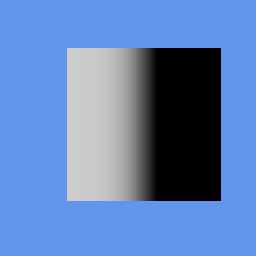
Four weights, per-pixel lighting — the highest-quality combination. Real XNA 4.0 output; CNA’s DIRECTX9 renderer matches it pixel-for-pixel.
Loading clips: SkinnedModelEXT, not Model
Animation lives on a different type than you might expect. Model — the XNA 4.0 type — carries a rigid per-mesh bone hierarchy. Hand-authored per-vertex GPU skinning lives on SkinnedModelEXT, a CNA extension marked CNAEXT and deliberately not built on Model/ModelBone/ModelMesh; the content loader reads it from .skinnedmodel.json. Skinned .cnj, .gltf and .glb files load as an ordinary Model whose parts use SkinnedEffect (or SkinnedPbrEffect for metallic-roughness materials): the first skin is Model::Tag (a SkinningData), every skin is listed in Model::getSkinsEXTProperty(), and AnimationPlayer drives them (see Tutorial 112). This tutorial uses SkinnedModelEXT because its clips and palette maths are the easiest to see.
auto model = getContentProperty()
    .Load<std::shared_ptr<SkinnedModelEXT>>("models/character");

// Clips is a plain map keyed by name -- iterate it, or index it directly.
for (const auto& [name, clip] : model->Clips) {
    std::cout << name << "  duration="
              << clip.Duration.getTotalSecondsProperty() << "s\n";
}
Each AnimationClipEXT holds a Duration and a per-bone Tracks vector of keyframes; a bone with no track simply holds its bind pose. Alongside the clips, the model carries the skeleton itself — BoneCount, ParentBoneIndices, BindPoseLocal and InverseBindPoseGlobal.
Bone Hierarchy and Matrix Palette
Characters are animated by walking the bone tree each frame and accumulating the full world-space transform for each bone. The process is:
- Sample each bone's local transform at the current clip time (interpolate between keyframes).
- Walk the bone tree from root to leaves, multiplying each bone's local transform by its parent's accumulated world transform.
- Multiply each resulting world transform by the bone's inverse bind-pose matrix to produce the final skinning matrix.
- Upload all skinning matrices to
SkinnedEffectviaSetBoneTransforms().
SkinnedModelEXT::ComputeBoneTransformsEXT does steps 1–3 in one call. Note what it takes and what it gives back: a clip name (a key into Clips), a System::TimeSpan playback position, a loop flag, and an output vector that comes back already multiplied by each bone's InverseBindPoseGlobal — skinning-ready, straight into the effect.
std::vector<Matrix> bones;
model->ComputeBoneTransformsEXT("Walk", playbackPosition_, /*loop=*/true, bones);
skinEffect_->SetBoneTransforms(bones);
For blending between two gaits, sample each clip into its own vector and interpolate. Matrix::Lerp is component-wise:
std::vector<Matrix> poseA, poseB;
model->ComputeBoneTransformsEXT("Walk", walkTime_, true, poseA);
model->ComputeBoneTransformsEXT("Run",  runTime_,  true, poseB);

std::vector<Matrix> poseBlend(poseA.size());
float blend = walkToRunFactor_;  // 0 = walk, 1 = run
for (std::size_t i = 0; i < poseA.size(); ++i) {
    poseBlend[i] = Matrix::Lerp(poseA[i], poseB[i], blend);
}
skinEffect_->SetBoneTransforms(poseBlend);
Component-wise lerp holds up well for small angular differences between two similar gaits. Once the poses diverge much, decompose to translation/rotation/scale and use Quaternion::Slerp on the rotation instead — a lerped rotation matrix is not, in general, a rotation matrix.
If you would rather not drive playback position yourself, AnimationPlayer wraps the same machinery: construct it over the skinning data, call StartClip, then Update(time, relativeToCurrentTime, loop) each frame and feed GetSkinTransforms() into SetBoneTransforms.
SkinnedEffect on the EasyGL GL profiles
SkinnedEffect has renderer tests on the EasyGL renderer (and on Vulkan, SDL_GPU, WebGPU and Metal). The three GL profile identities (OPENGLES3, OPENGL33, WEBGL2) share one internal implementation, EasyGL, so the mechanics below are the same on all three.
The palette of SkinnedEffect::MaxBones (72) matrices is roughly 4.6 KB. EasyGL uploads it as a loose mat4 array uniform (uBones[0]), re-sent whenever the palette changes. Seventy-two matrices occupy 288 vec4 slots, which is more than the 256 vec4 minimum the OpenGL ES 3.0 specification guarantees for a vertex shader, so like any large palette it relies on the larger limits real drivers report — check the device's actual uniform limit before writing a custom skinned ShaderEffect with a full-size palette.
Complete Example: Animated Character
#include "Microsoft/Xna/Framework/Graphics/SkinnedModelEXT.hpp"
#include "Microsoft/Xna/Framework/Graphics/SkinnedEffect.hpp"
#include "Microsoft/Xna/Framework/Graphics/ModelMeshPart.hpp"
#include "Microsoft/Xna/Framework/Input/Keyboard.hpp"

using namespace Microsoft::Xna::Framework::Input;   // Keyboard, Keys

class SkinnedGame final : public Game {
public:
    SkinnedGame() : graphics_(this) {}

protected:
    void LoadContent() override {
        auto& gd = getGraphicsDeviceProperty();

        // A skinned character is a SkinnedModelEXT, not a plain Model: it carries
        // the skeleton (BoneCount / InverseBindPoseGlobal) and its Clips map.
        model_ = getContentProperty().Load<std::shared_ptr<SkinnedModelEXT>>(
            "models/character");

        skinEffect_ = std::make_unique<SkinnedEffect>(gd);
        skinEffect_->setWeightsPerVertexProperty(4);

        // Lighting setup
        skinEffect_->setAmbientLightColorProperty(Vector3(0.3f, 0.3f, 0.35f));
        DirectionalLight& key = skinEffect_->getDirectionalLight0Property();
        key.setEnabledProperty(true);
        key.setDirectionProperty(Vector3::Normalize(Vector3(0.5f, -1.0f, -0.7f)));
        key.setDiffuseColorProperty(Vector3(1.0f, 0.9f, 0.8f));

        // Texture (shared across all parts)
        charTex_ = getContentProperty().Load<Texture2D>("textures/character_atlas");
        skinEffect_->setTextureProperty(&charTex_);

        // Clips live in the model, keyed by name. Sizing the palette to BoneCount
        // is what SetBoneTransforms expects.
        boneXforms_.resize(model_->BoneCount, Matrix::getIdentityProperty());
    }

    void Update(GameTime& gt) override {
        float dt = static_cast<float>(gt.getElapsedGameTimeProperty().getTotalSecondsProperty());
        clipTime_ += dt;

        auto kb = Keyboard::GetState();
        if (kb.IsKeyDown(Keys::W)) isWalking_ = true;
        if (kb.IsKeyDown(Keys::S)) isWalking_ = false;

        // ComputeBoneTransformsEXT samples the clip and hands back matrices that
        // are already multiplied by InverseBindPoseGlobal — ready for the palette.
        // Passing loop = true wraps the position instead of clamping it.
        model_->ComputeBoneTransformsEXT(
            isWalking_ ? "Walk" : "Idle",
            System::TimeSpan::FromSeconds(clipTime_),
            /*loop=*/true,
            boneXforms_);

        skinEffect_->SetBoneTransforms(boneXforms_);
    }

    void Draw(const GameTime&) override {
        auto& gd = getGraphicsDeviceProperty();
        gd.Clear(Color::CornflowerBlue);

        skinEffect_->setWorldProperty(Matrix::getIdentityProperty());
        skinEffect_->setViewProperty(view_);
        skinEffect_->setProjectionProperty(proj_);

        // Draw every part of the model with the skinned effect
        for (const auto& part : model_->Parts) {
            gd.SetVertexBuffer(part.Part->getVertexBufferProperty());
            gd.setIndicesProperty(part.Part->getIndexBufferProperty());
            for (auto& pass : skinEffect_->getCurrentTechniqueProperty()->getPassesProperty()) {
                pass.Apply();
                gd.DrawIndexedPrimitives(
                    PrimitiveType::TriangleList,
                    part.Part->getVertexOffsetProperty(), 0,
                    part.Part->getNumVerticesProperty(),
                    part.Part->getStartIndexProperty(),
                    part.Part->getPrimitiveCountProperty());
            }
        }
        // No gd.Present(): Game presents in EndDraw().
    }

private:
    GraphicsDeviceManager                 graphics_;
    std::shared_ptr<SkinnedModelEXT>      model_;
    std::unique_ptr<SkinnedEffect>        skinEffect_;
    Texture2D              charTex_;
    float                                 clipTime_  = 0.0f;
    bool                                  isWalking_ = false;
    std::vector<Matrix>                   boneXforms_;
    Matrix                                view_ = Matrix::getIdentityProperty();
    Matrix                                proj_ = Matrix::getIdentityProperty();
};
Deep dives on this topic
Long-form pages that explain the exact semantics, invariants and evidence behind this subject.
- Avatars: the standard XNA avatar API on CNA's own avatars — How CNA's XNA avatar classes draw original CNA avatars on XNA's 71-bone rig: descriptions, the renderer, the 31 presets, catalogs and the editor, plus the separate SkinnedModelEXT extension and the evidence behind both.
- The XNA stock effects: exact semantics, worked uses and verification history — BasicEffect, AlphaTestEffect, DualTextureEffect, EnvironmentMapEffect and SkinnedEffect in CNA: defaults, formulas, ordering traps, per-vertex versus per-pixel lighting, worked uses and the defect patterns behind the current code.