Tutorial 40: Primitive Types
What you’ll learn
- Every
PrimitiveTypevalue and the case each one wins. - Winding order and how it drives back-face culling.
- Choosing between
DrawPrimitivesandDrawIndexedPrimitives. - Converting a vertex or index count into a primitive count.
Before you start — Tutorial 38: Vertex Buffers and Index Buffers — primitive type is an argument to the draw calls covered there. Requires a 3D-capable renderer such as OPENGLES3 or VULKAN; the 2D-only renderer (SDL_RENDERER) throws on 3D calls by default, and STUB reports no 3D capability at all.
The PrimitiveType enum controls how the GPU assembles raw vertex data into geometry. Choosing the right primitive type affects both performance and the structure of your vertex or index buffers.
The PrimitiveType enum
XNA 4.0 has four primitive types, and CNA has all four. CNA adds a fifth, point lists, as a CNAEXT value named PointListEXT (there is no plain PointList):
namespace Microsoft::Xna::Framework::Graphics {

    enum class PrimitiveType {
        TriangleList,   // every 3 vertices form an independent triangle
        TriangleStrip,  // first triangle = verts 0,1,2; each extra vert adds one triangle
        LineList,       // every 2 vertices form an independent line segment
        LineStrip,      // connected polyline; first segment = verts 0,1
        PointListEXT,   // CNAEXT: each vertex is a rendered point (not in XNA 4.0)
    };

} // namespace
When to use each
- TriangleList — most common. Each triangle is self-contained, making it easy to combine meshes. It is also the usual choice with
DrawIndexedPrimitives, although every primitive type is legal there. - TriangleStrip — useful for ribbons, terrain strips, or generated geometry where vertices are shared between adjacent triangles. Uses roughly half the vertex bandwidth of a list for the same geometry.
- LineList — debug overlays, grids, wire frames. Every pair of vertices is independent.
- LineStrip — paths, trajectories, spline previews. One vertex shared between adjacent segments.
- PointListEXT — star fields and point clouds. There is no point-size state in
RasterizerStateand the stock shaders draw one-pixel points, so sized points or particles need a custom shader (ShaderEffect) or textured quads instead.
Three of them, drawn by the real XNA runtime
These frames are from CNA's XNA oracle corpus (tools/xna-oracle/): genuine Microsoft XNA 4.0 runtime output (captured under Wine + DXVK on Linux), against which CNA's DIRECTX9 renderer is diffed at --tolerance 0 by hand, outside CI. They show what the same vertex data produces under three different PrimitiveType values.
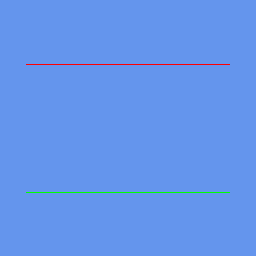
LineList — each vertex pair is an independent segment, so the two lines are disconnected. Real XNA 4.0 output; CNA's DIRECTX9 renderer is recorded as matching it pixel-for-pixel.
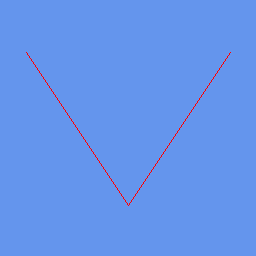
LineStrip — segments share a vertex, producing one connected polyline. Real XNA 4.0 output; CNA's DIRECTX9 renderer is recorded as matching it pixel-for-pixel.
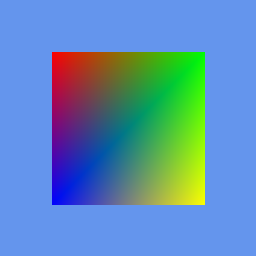
TriangleStrip — four vertices become two triangles sharing an edge, filling a quad. Real XNA 4.0 output; CNA's DIRECTX9 renderer is recorded as matching it pixel-for-pixel.
Winding order and back-face culling
CNA follows the XNA / Direct3D convention, which is the opposite of the OpenGL default: a triangle whose vertices run clockwise on screen is front-facing. Every renderer implements this (for example the Vulkan renderer sets its front face to clockwise), and CNA tests it against the XNA contract on each rasterising renderer. The state names say which faces they cull:
| RasterizerState preset | CullMode | Culls |
|---|---|---|
CullCounterClockwise (the default) | CullCounterClockwiseFace | counter-clockwise triangles, so clockwise ones are visible |
CullClockwise | CullClockwiseFace | clockwise triangles |
CullNone | None | nothing: both sides are drawn |
So the default state culls counter-clockwise triangles. A mesh exported with OpenGL-style counter-clockwise front faces will look inside-out until you reverse its index order or switch to CullClockwise.
// Triangle with CLOCKWISE winding as seen from +Z looking toward the origin: visible
VertexPositionColor verts[] = {
    { Vector3( 0.0f,  0.5f, 0.0f), Color::Blue  },  // top-center   (index 0)
    { Vector3( 0.5f, -0.5f, 0.0f), Color::Green },  // bottom-right (index 1)
    { Vector3(-0.5f, -0.5f, 0.0f), Color::Red   },  // bottom-left  (index 2)
    // 0 -> 1 -> 2 is clockwise when viewed from the front: front-facing, drawn.
    // The reverse order (bottom-left, bottom-right, top) is counter-clockwise: culled by default.
};

// Disable culling to see both sides (e.g. flat sprites)
gd.setRasterizerStateProperty(RasterizerState::CullNone);
DrawPrimitives vs DrawIndexedPrimitives
DrawPrimitives reads vertices sequentially; every vertex in the buffer is unique.
DrawIndexedPrimitives reads through an IndexBuffer of uint16_t or uint32_t indices, allowing vertices to be shared between triangles — critical for reducing GPU memory when a mesh has thousands of shared vertices. Two profile limits apply to either draw call under CNA’s default Reach graphics profile: 32-bit indices are refused, and a single draw of more than 65,535 primitives throws System::NotSupportedException (the HiDef ceiling is 1,048,575). See Tutorial 38 and Tutorial 152.
// DrawPrimitives — sequential, no index buffer
gd.SetVertexBuffer(vertexBuffer);
gd.DrawPrimitives(PrimitiveType::TriangleList,
                  /*startVertex=*/0,
                  /*primitiveCount=*/numTriangles);

// DrawIndexedPrimitives — indexed, requires an IndexBuffer bound
gd.SetVertexBuffer(vertexBuffer);
gd.setIndicesProperty(indexBuffer);    // XNA's GraphicsDevice.Indices
gd.DrawIndexedPrimitives(PrimitiveType::TriangleList,
                         /*baseVertex=*/0,
                         /*minVertexIndex=*/0,
                         /*numVertices=*/numVertices,
                         /*startIndex=*/0,
                         /*primitiveCount=*/numTriangles);
There is one form of DrawIndexedPrimitives, with six arguments: (type, baseVertex, minVertexIndex, numVertices, startIndex, primitiveCount). numVertices is how many vertices from minVertexIndex onward the call may reference.
Triangle count calculation
The primitiveCount parameter to DrawPrimitives is not the vertex count. Use these formulas:
| PrimitiveType | primitiveCount from N vertices |
|---|---|
| TriangleList | N / 3 |
| TriangleStrip | N - 2 |
| LineList | N / 2 |
| LineStrip | N - 1 |
| PointListEXT | N |
Code example: debug grid with LineList and a triangle-strip ribbon
#include "Microsoft/Xna/Framework/Game.hpp"
#include "Microsoft/Xna/Framework/GraphicsDeviceManager.hpp"
#include "Microsoft/Xna/Framework/Graphics/BasicEffect.hpp"
#include "Microsoft/Xna/Framework/Graphics/VertexBuffer.hpp"
#include "Microsoft/Xna/Framework/Graphics/VertexPositionColor.hpp"

using namespace Microsoft::Xna::Framework;
using namespace Microsoft::Xna::Framework::Graphics;

class PrimitiveDemo final : public Game {
public:
    PrimitiveDemo() : graphics_(this) {
        graphics_.setPreferredBackBufferWidthProperty(800);
        graphics_.setPreferredBackBufferHeightProperty(600);
    }

protected:
    void LoadContent() override {
        effect_ = std::make_unique<BasicEffect>(getGraphicsDeviceProperty());
        effect_->VertexColorEnabled = true;

        // --- Grid: LineList ---
        // 11 horizontal + 11 vertical lines = 22 lines = 44 vertices
        std::vector<VertexPositionColor> gridVerts;
        gridVerts.reserve(44);
        for (int i = 0; i <= 10; ++i) {
            float x = -1.0f + i * 0.2f;
            gridVerts.push_back({ Vector3(x, -1.0f, 0.0f), Color(80, 80, 80) });
            gridVerts.push_back({ Vector3(x,  1.0f, 0.0f), Color(80, 80, 80) });
        }
        for (int i = 0; i <= 10; ++i) {
            float y = -1.0f + i * 0.2f;
            gridVerts.push_back({ Vector3(-1.0f, y, 0.0f), Color(80, 80, 80) });
            gridVerts.push_back({ Vector3( 1.0f, y, 0.0f), Color(80, 80, 80) });
        }
        gridLineCount_ = static_cast<int>(gridVerts.size()) / 2; // primitiveCount

        gridVB_ = std::make_unique<VertexBuffer>(
            getGraphicsDeviceProperty(),
            VertexPositionColor::getVertexDeclarationStatic(),
            static_cast<int>(gridVerts.size()),
            BufferUsage::None);
        gridVB_->SetData(gridVerts.data(), static_cast<int>(gridVerts.size()));

        // --- Ribbon: TriangleStrip ---
        // A sine-wave ribbon with alternating bottom/top vertices
        std::vector<VertexPositionColor> ribbonVerts;
        const int steps = 40;
        for (int i = 0; i <= steps; ++i) {
            float t  = static_cast<float>(i) / steps;
            float x  = -0.9f + t * 1.8f;
            float cy = std::sin(t * MathHelper::TwoPi) * 0.3f;
            // Bottom vertex FIRST: the first strip triangle is then (bottom, top, next bottom),
            // which is clockwise on screen and survives the default CullCounterClockwise.
            // (Strips flip the winding on every other triangle, so the rest follow.)
            ribbonVerts.push_back({ Vector3(x, cy - 0.05f, 0.0f), Color::Orange });
            ribbonVerts.push_back({ Vector3(x, cy + 0.05f, 0.0f), Color::Yellow });
        }
        ribbonVertCount_ = static_cast<int>(ribbonVerts.size());

        ribbonVB_ = std::make_unique<VertexBuffer>(
            getGraphicsDeviceProperty(),
            VertexPositionColor::getVertexDeclarationStatic(),
            ribbonVertCount_,
            BufferUsage::None);
        ribbonVB_->SetData(ribbonVerts.data(), ribbonVertCount_);
    }

    void Update(GameTime&) override {}

    void Draw(const GameTime&) override {
        auto& gd = getGraphicsDeviceProperty();
        gd.Clear(Color::Black);

        effect_->setWorldProperty(Matrix::getIdentityProperty());
        effect_->setViewProperty(Matrix::CreateLookAt(
            Vector3(0, 0, 2), Vector3::Zero, Vector3::Up));
        effect_->setProjectionProperty(Matrix::CreateOrthographic(2.0f, 1.5f, 0.1f, 10.0f));

        // Draw grid (LineList)
        gd.SetVertexBuffer(gridVB_.get());
        for (auto& pass : effect_->getCurrentTechniqueProperty()->getPassesProperty()) {
            pass.Apply();
            gd.DrawPrimitives(PrimitiveType::LineList, 0, gridLineCount_);
        }

        // Draw ribbon (TriangleStrip)
        // primitiveCount = vertexCount - 2 for a strip
        gd.SetVertexBuffer(ribbonVB_.get());
        for (auto& pass : effect_->getCurrentTechniqueProperty()->getPassesProperty()) {
            pass.Apply();
            gd.DrawPrimitives(PrimitiveType::TriangleStrip, 0, ribbonVertCount_ - 2);
        }
        // No gd.Present(): Game presents in EndDraw, after Draw() returns.
    }

private:
    GraphicsDeviceManager      graphics_;
    std::unique_ptr<BasicEffect> effect_;
    std::unique_ptr<VertexBuffer> gridVB_;
    std::unique_ptr<VertexBuffer> ribbonVB_;
    int gridLineCount_   = 0;
    int ribbonVertCount_ = 0;
};

int main() { PrimitiveDemo game; game.Run(); }
Key takeaways
- Pass primitive count, not vertex count, to
DrawPrimitives. - Clockwise winding is front-facing in CNA (matching XNA and Direct3D, not the OpenGL default); the default
CullCounterClockwisestate culls counter-clockwise triangles. - Plain
PointListdoes not exist; the point primitive is the CNAEXT valuePointListEXT, drawn as one-pixel points by the stock shaders. DrawIndexedPrimitivestakes six arguments; 32-bit indices and draws of more than 65,535 primitives need the HiDef profile.- Use
DrawIndexedPrimitivesfor meshes with shared vertices to save GPU bandwidth. - Disable culling with
RasterizerState::CullNonefor 2D sprites or double-sided geometry.